
Governing your company's data and knowledge.
Today, bringing AI into your company takes an afternoon. You open ChatGPT, Claude, Copilot or Gemini, connect your email, your documents and your spreadsheets, and it's up and running. And it works. In fact, almost everything I'm about to show you can be done with them, one way or another.
The trouble comes later. Everything you connect, and everything you build on top, lives in their house, and every provider would love to have you as a captive customer. Then prices go up, a better model comes out somewhere else or a more powerful tool shows up, and you're still tied to the same provider. Good luck getting out.
That was the subject of the previous article, where I introduced the CORE Model. What your company knows sits at the center and belongs to you, and the provider sits at the edge, where it can be swapped. That was theory, and theory alone doesn't convince me. I've spent months building a tool to see whether it holds up off the page.
Today I'm using it to show you the center of the model, the C, which is what your company knows. You'll see hardly any chats or agents. What you'll see is how a company's data and knowledge get governed: knowing what it knows, where that came from, who answers for it and who is allowed to see it.
A few things before we start. The example is made up and the screenshots come from my own tool, so ask it the same question you'd ask any other: the day you want to leave, can you take what your company knows with you? The screenshots are in Spanish, because that's the language the demo runs in, so I walk you through each one. And there's no jargon. If you don't work in tech and you can follow this, the article has done its job.
The model, in one minute
In case you missed the first article. The CORE Model draws a company's AI as circles, with four pieces. The name is a little misleading: it spells CORE because that's the idea, but the letters don't follow the order of the drawing. The actual order, from the inside out, is C, R, O, E:
- C · Company knowledge. What the company knows. It sits at the center.
- R · Rules. Who can see and do what. Also at the center, right next to the knowledge.
- O · Orchestration. The agents in each area, working on top of that center.
- E · Extensions. The tools, plus the model and cloud providers. At the edge, and swappable.
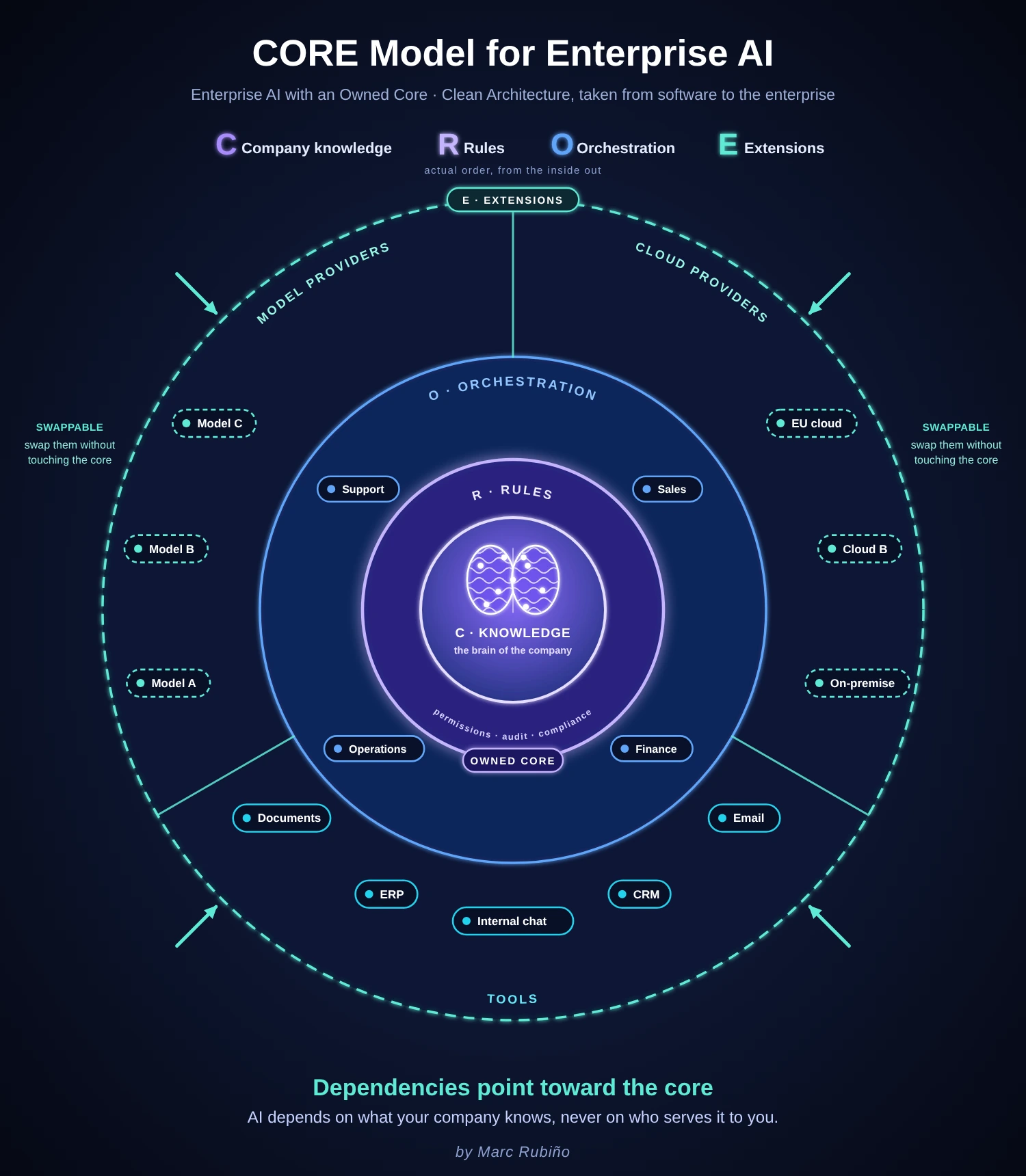
Dependencies point toward the center: AI depends on what your company knows, never on who serves it to you. Today is about the first piece, the C.
What I'd ask of any knowledge core
Before I show you anything, here's the list, so you know where we're headed.
These days almost any tool lets you "chat with your documents". Engineers call it RAG, and there are fancier versions with graphs and nodes. They all solve the same problem, which is finding things: they locate whatever best matches your question and write it up nicely. What a search tool doesn't know on its own is whose text that is, whether it still holds, whether another document says the opposite, or whether you should be able to see it at all.
That's governance, and it's what separates a company brain from a search tool. Whether you build it yourself, buy it off the shelf or use somebody else's framework, this is what I'd ask of the C in any CORE:
- It knows how the company is organized. Areas, who reports to whom, and who answers for each one.
- Every source has an owner and a scope. The whole company or a single area. That label travels with the source and decides who gets to see it.
- Everything it knows says where it came from, since when it holds and who signed off on it.
- It keeps the history. Old versions are retired, not deleted, and you can see what was known on any given day.
- It finds duplicates and contradictions, and doesn't settle them on its own when the answer isn't clear.
- When it doesn't know something, it says so.
- It asks the right person, and within limits.
- It warns you about anything that depends on a single source.
- Official sources keep themselves up to date.
Notice that none of the nine is about giving better answers. They're about ownership, validity, doubts and who can see what. Put like that it sounds like a wish list, so I'm going to show them working, with an example. On each screenshot I'll tell you which item on the list you're looking at.
The example: Despacho Nuevo Rumbo
A law firm that picks up the phone 40 of the 168 hours in a week
So this doesn't stay a nice drawing, I'll use an example anyone can follow. Despacho Nuevo Rumbo is a law firm with offices in Valencia, Barcelona and Madrid, the kind that helps people drowning in debt start over, under what Spain calls the Second Chance law. As I said, it's made up: the firm and all the data you're about to see.
Do the math with me. A week has 168 hours and the firm is open for 40. What happens in the other 128? The phone rings, a WhatsApp comes in or an email arrives, and nobody's there to answer. And think about who's on the other end: someone who hasn't slept in months because of their debts and has finally worked up the nerve to call on a Saturday night. That person isn't going to wait until Monday. They'll call the next firm on the list.
The first thing that comes to mind is to put an AI on the phones, and that's exactly what everyone is doing. But think about it coldly: letting an AI talk on its own to people in that situation can go very well, or it can land you in serious trouble. So before switching it on, I want three things clear: what it knows, what I let it do, and who answers for it when it gets something wrong. That's called governance and, even if it sounds like a consultant's word, for me it's the key to everything else.
We'll take care of the Saturday-night caller in another article. Today is about what has to be in place before you let an AI answer them.
C is for Company knowledge
The first thing I'm showing you isn't a chat or an agent. It's the company: the firm, its areas and the people who work in each one.
It may look like a mere setup step. Imagine your company's brain knows everyone's salary. I assume you'd want only finance to be able to look that up, right? Or that what goes on in operations stays out of support's view. Or, if your company is opening offices, that the Barcelona office sees its own data and the company-wide data, but not the other offices'. And if you work across several countries, the regulation itself may force you to keep each country's data separate.
None of that is possible unless the AI first knows how your company is organized. That's why I start here.
What you're looking at Item 1 on the list
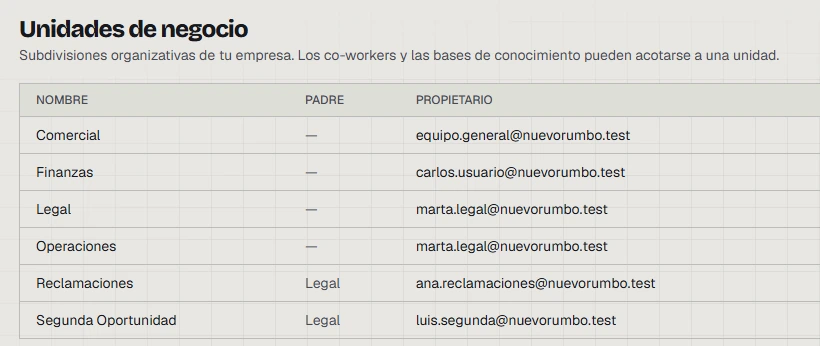
The firm's org chart, as is, but inside the tool. Each row is an area. Look at two columns:
- Owner ("Propietario"). Every area has a named person who answers for it. If the AI says something odd about a claim tomorrow, nobody has to open an investigation to find out whose problem it is. It's written right there.
- Parent ("Padre"). Reclamaciones (Claims) and Segunda Oportunidad (Second Chance) hang off Legal, just as they would in a real firm. Whatever is decided for Legal reaches both without having to repeat it.
Why it mattersEverything that comes next rests on this. When I tell you in the next article that finance can see salaries and support can't, the AI will know because this is where we told it who's who.
Now, what the firm knows. Knowledge rests on two things, and it's worth not mixing them up.
The first is the knowledge bases. Think of them as the firm's filing cabinets. You fill them by uploading documents or by connecting what the company already uses, whether that's SharePoint, Confluence, Jira or Notion. The example has four. Two belong to the whole firm: its shared knowledge and the Second Chance law, which nobody uploaded by hand. It comes in connected straight to the BOE, Spain's official gazette, as an official source. The other two belong to a single area: the criteria and cases for Claims, and those for Second Chance.
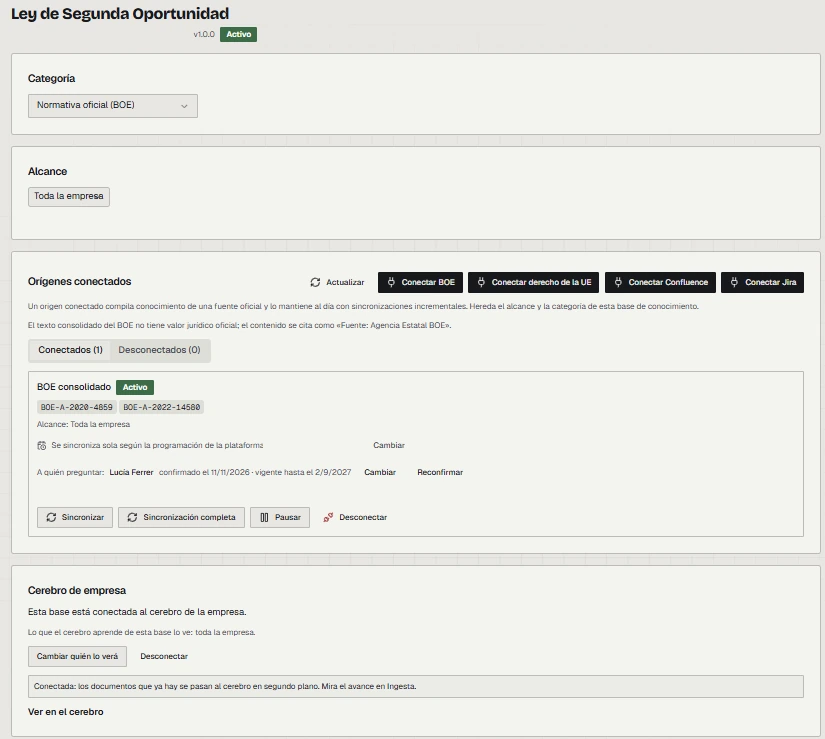
Here's one of those cabinets from the inside, the one for the law.
What you're looking at Items 2 and 9 on the list
Four things, top to bottom:
- Scope ("Alcance"). Here it says "Toda la empresa", the whole company, so anyone at the firm can consult the law. On the Claims and Second Chance bases it shows the name of the area, and only that area sees them.
- Source ("Orígenes conectados"). The base is connected to the BOE and updates itself every night. The firm doesn't have to remember to check whether the law has changed, and it doesn't end up working from an outdated version without noticing.
- Who to ask ("A quién preguntar"). It shows the name of the person responsible, the day they confirmed it and how long that confirmation is good for. So even the owner expires, and after a while someone has to confirm they're still the right person.
- The link to the brain. At the bottom you can see who will be able to see whatever the brain learns from this base. That label travels with it.
The second is the brain. If the bases are the filing cabinets, the brain is that colleague who has read all of it and keeps it on index cards. When you connect a base to the brain, it starts pulling out facts: concrete statements you can check, like "on the phone line, a person answers during office hours". And every fact carries where it came from, since when it holds and who is responsible for it.
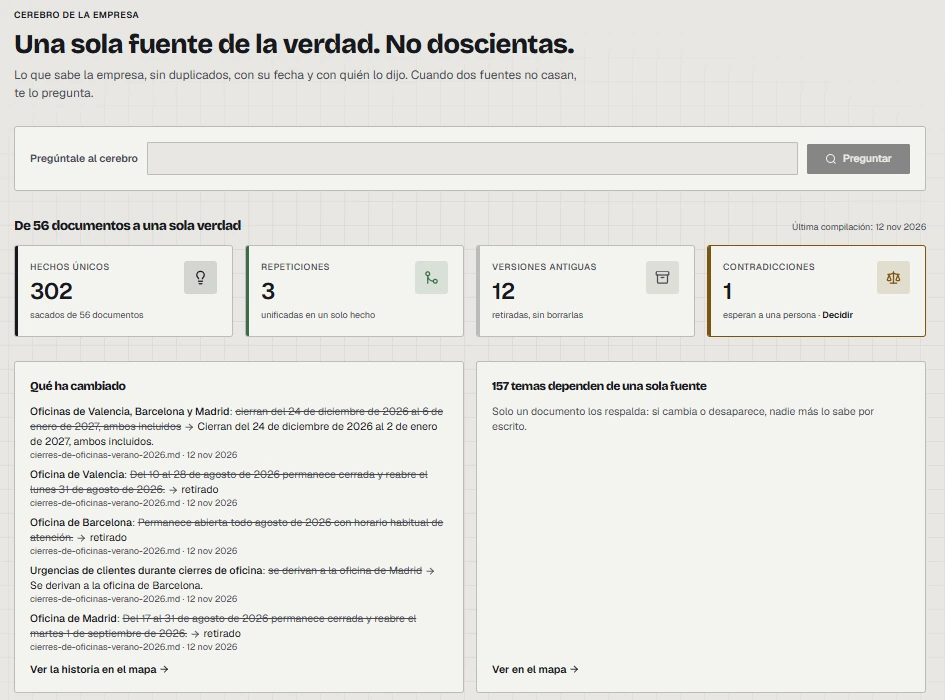
What you're looking at Items 4, 5 and 8 on the list
Everything the firm knows, summed up in four numbers:
- 302 facts, drawn from 56 documents.
- 3 duplicates. Things that were written down in several places and are now one.
- 12 old versions. Retired but not deleted, in case someone needs to look back one day.
- 1 contradiction, waiting for a person.
Below that there are two more panels:
- What has changed. On the left, with the old text struck through and the new one beside it.
- 157 topics depend on a single source. On the right, a warning. If that document gets lost, the firm no longer knows it. That happens in every company. The difference is that here someone tells you.
Why it mattersRead the contradiction box carefully, because it's the whole model in miniature. The AI finds the problem, and someone at the firm decides.
Open one of those facts and this is what's inside.
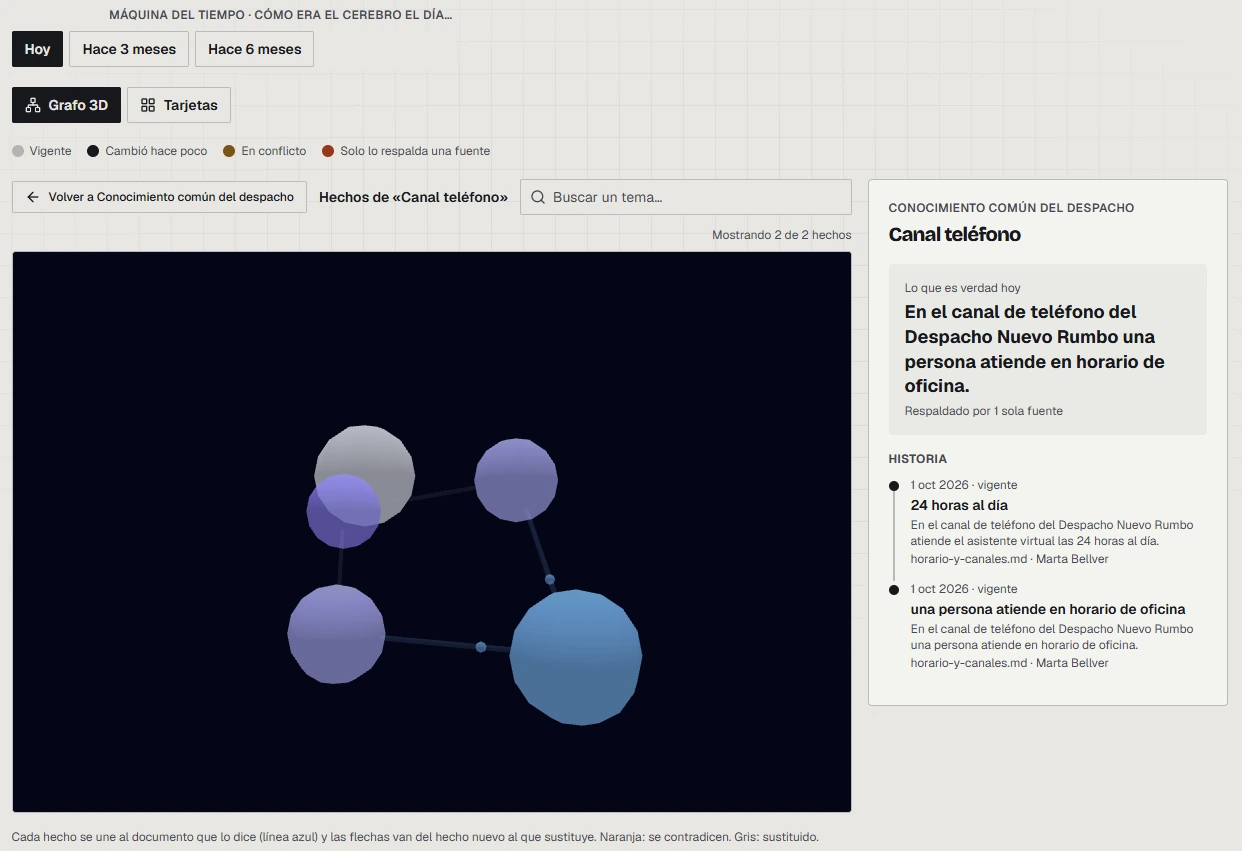
What you're looking at Items 3, 4 and 8 on the list
Start on the right, which is the part that matters:
- What's true today ("Lo que es verdad hoy"). It's the very fact the example started from: on the phone, a person answers, during office hours.
- Its history. Just below, with the date, the document it comes from and the person who answers for it, here Marta.
- Backed by a single source ("Respaldado por 1 sola fuente"). The brain is telling you that only one document says this, and I think it's healthy that it says so instead of taking it for granted.
- The map. On the left, how the facts relate to each other.
- The time machine. At the very top. You can ask the brain to show you what the firm knew three months ago, or six.
Why it mattersIf a client complains about something they were told last summer, you can see what was true at the firm that day.
Here comes my favorite part. As it sorts the facts, the brain notices when something doesn't add up: two documents that say different things, a new version that overrides the old one, or a missing piece. And instead of picking one on its own, it does what a good new hire would do, which is ask someone who knows.
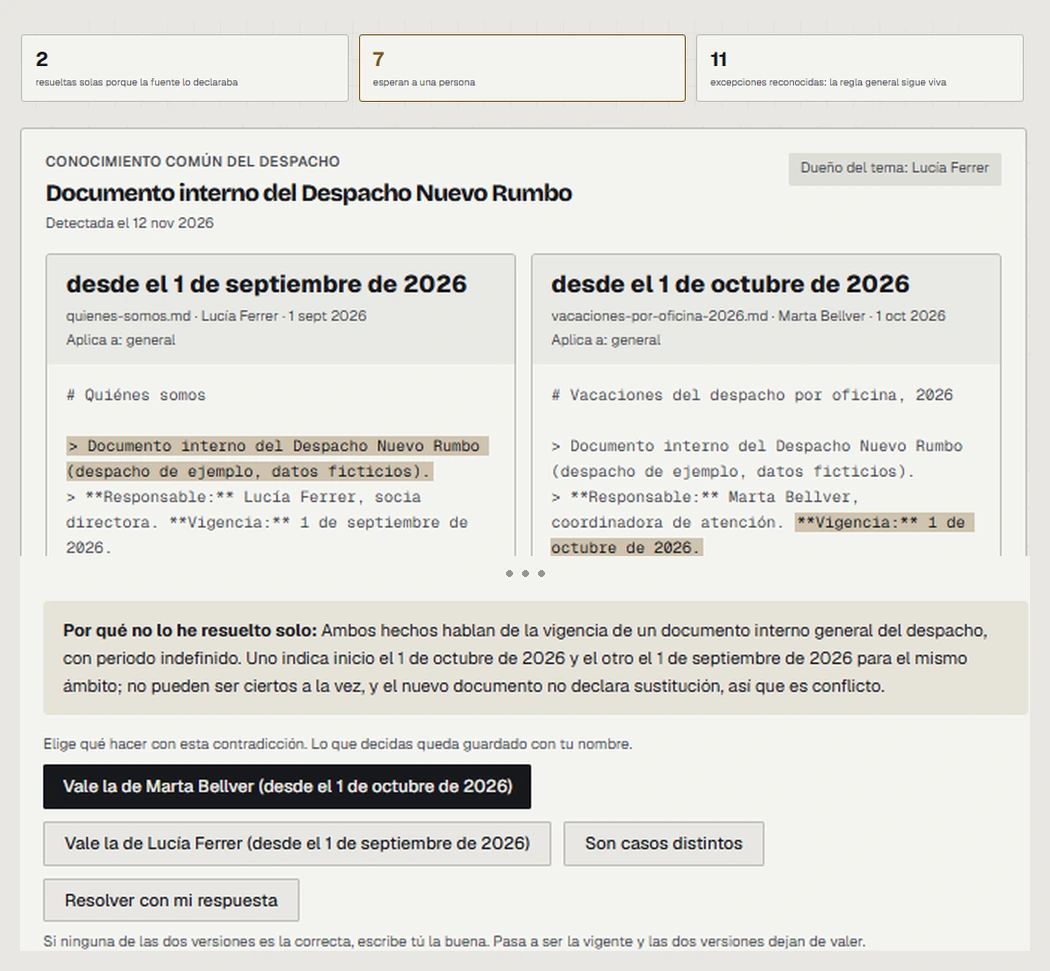
What you're looking at Item 5 on the list
Start with the three numbers at the top:
- 2 resolved themselves, because the new document clearly stated that it replaced the old one.
- 11 were exceptions, cases where the general rule still stands.
- 7 are waiting for a person. The summary earlier showed only one because I took that screenshot before the brain had finished reading the law.
Below are the two versions, side by side, each with its document, its author and its date. And at the bottom, the options: Marta's version stands, Lucía's version stands, they're different cases, or you write the right answer yourself. Whatever you decide is saved under your name.
Why it mattersThe box titled "Por qué no lo he resuelto solo" ("Why I didn't resolve this on my own") explains why the brain didn't dare decide, so whoever resolves it knows what to look at.
It does ask politely, though. For each owner, the tool records how they want to be asked, during which hours and how many questions a day at most.
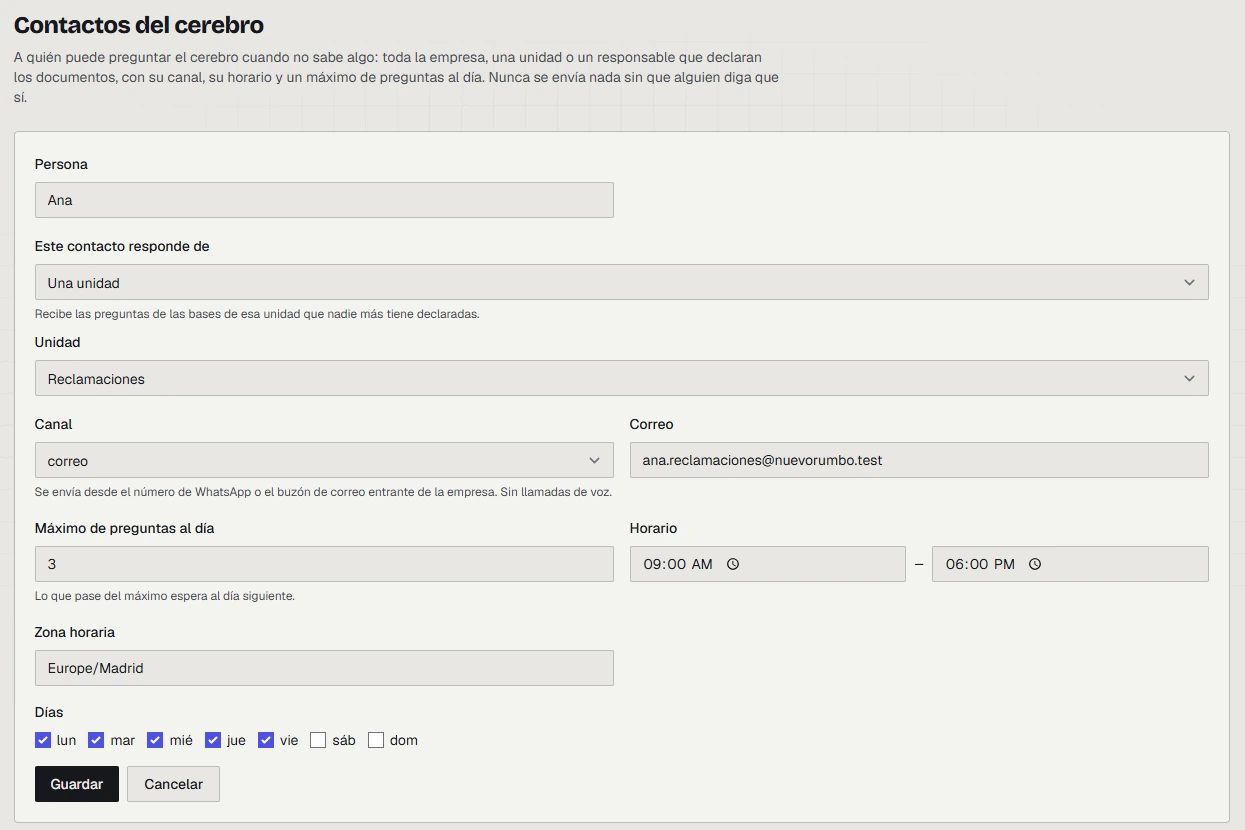
What you're looking at Item 7 on the list
This is the card for Ana, who answers for everything to do with Claims. It records how she wants to be asked:
- Where. By email.
- When. Monday to Friday, nine to six.
- How much. Three questions a day at most. The fourth waits until tomorrow.
Why it mattersIt looks like a minor detail and to me it isn't. Nobody wants an AI that writes to them twenty times at eleven at night, and if the tool wears people out, people stop answering and the knowledge stays exactly where it was.
And this is what happens when someone asks the brain something it doesn't know.
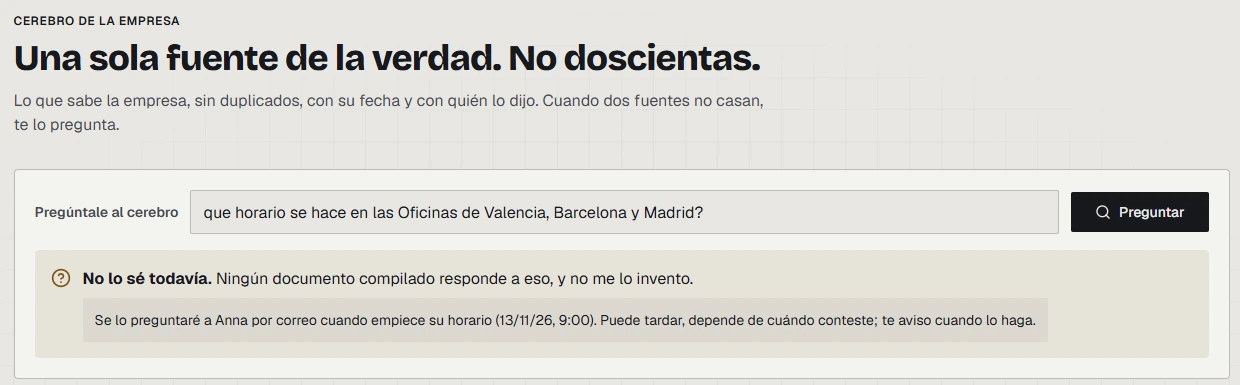
What you're looking at Items 6 and 7 on the list
I asked it about the opening hours of the three offices, and no document says. Watch what it does:
- It doesn't make it up. A typical AI would have given me an answer, and a very confident one. This one says "I don't know yet, and I won't make it up".
- It tells me what it's going to do. It will ask Ana by email tomorrow at nine, when her hours start. That's the card from before, at work.
- It asks my permission. It doesn't go behind my back. The question only goes out if I agree.
- It doesn't lose the question. It stays on a list, and from there an administrator can wait for Ana to reply, send it right away if it's urgent, or answer it themselves if they know.
Why it mattersWith every answer the brain learns, and that question doesn't come up again. That's how knowledge silos start to disappear, the kind where only Marta knows something and it lives in her head or in her folder.
Back to the list
Look back over the screenshots and you'll notice the AI has hardly answered anything. What showed up was who owns each thing, where it comes from, since when it holds and what happens when something doesn't add up. The nine items on the list are all there, and none of them depends on the tool I used to show them to you.
If your company's AI doesn't do this, you don't have a core. You have a search engine with good manners.
What I've learned in these months
I told you at the start that I've been at this for months, so here are the two things that have most changed how I work.
The first is that, whenever you can, the process has to be deterministic. In plain English: let a program with fixed rules decide, not the model. You've just seen the example. Whether the brain answers something it doesn't know isn't left to the AI's good intentions. There's a barrier written in code. Why? Because a model can give you one answer today and a different one tomorrow to the same question, and a program can't.
And here's the curious part. What AI does best today is write code. So that's what I use it for, to write those programs, and then I don't let it decide. A program also lets you audit, at any moment, what happened and why.
The second is that everything that can be versioned should be. Things don't come out right the first time, you have to keep trying and fixing, and the day a change makes things worse you need to be able to go back.
What it doesn't solve yet
Let me be clear: this is an example, not a client. These are demos with made-up data, and the firm doesn't exist.
It isn't perfect either. The brain sometimes sees contradictions where there aren't any. The one in the screenshot is one of them, because it compares the dates of two documents that have nothing to do with each other. And when it finished reading the law, it flagged as contradictory some articles that, as far as I can tell, deal with different cases. That's what the "they're different cases" option is for, and it's why a person has the last word. But every false alarm takes up someone's time, and it's one of the things I still have the most work to do on.
A shared brain also spreads mistakes, because if someone loads a wrong piece of data, every agent inherits it at once. That's why every piece of data has an owner.
Something to think about this week
If your AI gets something wrong with a client tomorrow, do you know where it got the answer? And how many things in your company are written down in only one place?
In the next article I move on to the other half of the center, the R, the Rules. You'll see Ana, Luis and Carlos ask the brain the same question and get three different answers, and why that's exactly what should happen.
The screenshots are from a tool I'm building. The firm is fictional and the data is made up.
CORE Model for Enterprise AI · 2
 Previous article · CORE Model 1Your Company AI Needs an Owned CoreRead the first article in the series →